
How to Calculate Real Shopify Profit (Step-by-Step Guide for 2026)
 Brian @brian
·
·
6 min read
21 views
Brian @brian
·
·
6 min read
21 views
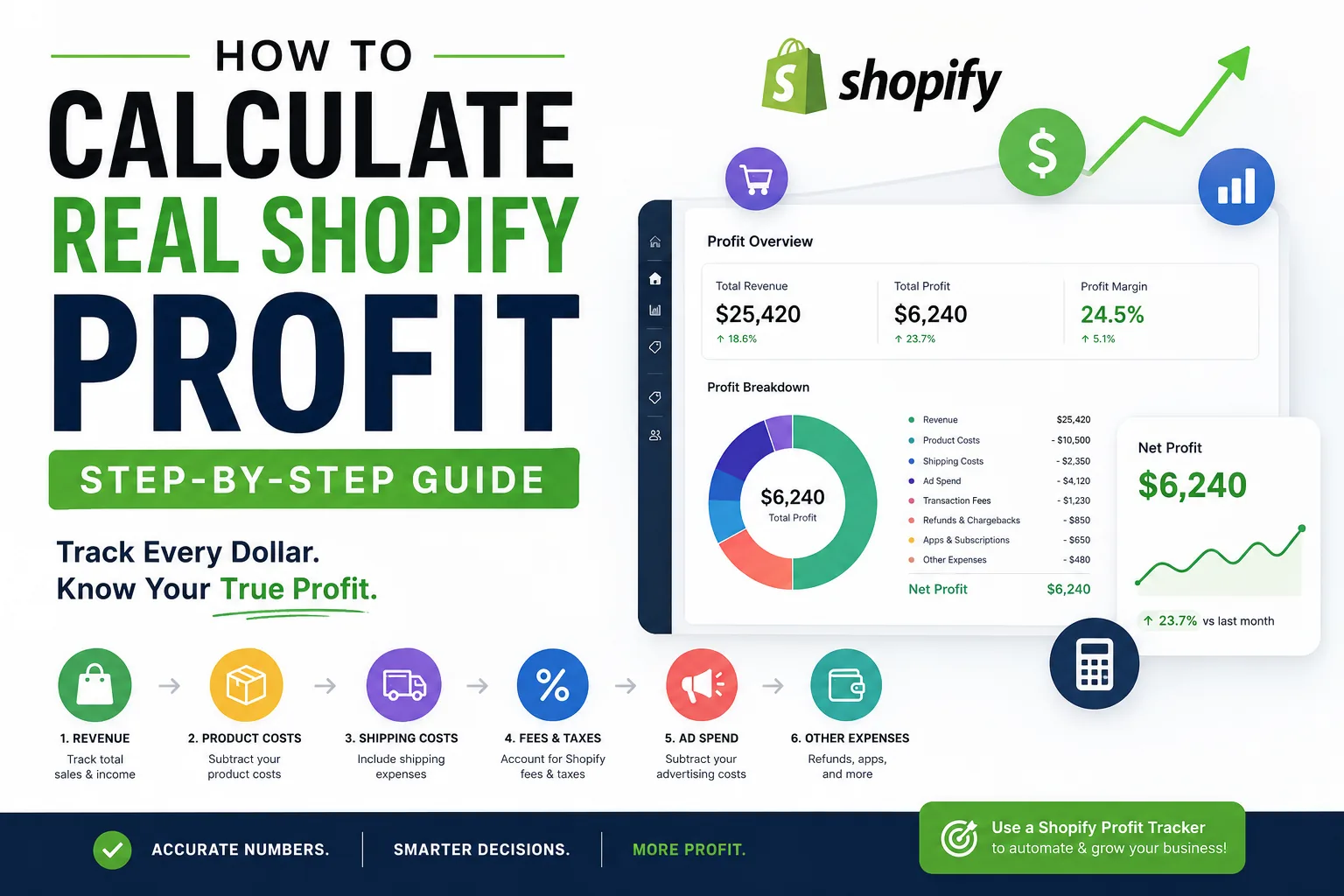
Many Shopify store owners think they're profitable because sales are increasing.
Then tax season arrives.
Or they check their bank account.
Suddenly, the numbers don't match.
The truth is simple:
Revenue is not profit.
A Shopify store can generate $10,000 in sales and still lose money.
That is why learning how to calculate real Shopify profit is one of the most important skills for any ecommerce entrepreneur.
In this guide, you'll learn exactly how to calculate your true Shopify profit, which expenses most store owners forget to track, and how a Shopify profit tracker can help you monitor your business automatically.
Why Revenue Does Not Equal Profit
One of the biggest mistakes new Shopify store owners make is focusing on revenue.
You might see:
- $5,000 in sales this week
- $20,000 this month
- $100,000 this quarter
Those numbers feel exciting.
But sales alone don't tell the full story.
Profit is what remains after all expenses have been deducted.
A store generating $50,000 in monthly sales may earn less profit than a store generating $15,000 if expenses are poorly managed.
Real Shopify profit includes:
- Product costs
- Shipping costs
- Advertising costs
- Shopify fees
- Payment processing fees
- App subscriptions
- Refunds
- Chargebacks
- Operational expenses
Ignoring any of these costs creates inaccurate profit calculations.
What Is Shopify Profit?
Shopify profit is the amount of money left after subtracting all business expenses from your revenue.
The basic formula looks like this:
Profit = Revenue - Expenses
However, real ecommerce profit is much more detailed.
A better formula is:
Profit = Revenue - Product Costs - Shipping Costs - Transaction Fees - Advertising Costs - Refunds - Business Expenses
Every dollar spent running your store must be accounted for.
This is why successful ecommerce brands track profit daily rather than relying on revenue reports.
Step 1: Calculate Total Revenue
Start by identifying your total revenue.
Revenue includes:
- Product sales
- Upsells
- Bundles
- Subscription revenue
- Shipping charges collected from customers
Example:
100 Orders × $50 Average Order Value
Revenue = $5,000
At this point many store owners incorrectly assume they made $5,000.
The next steps reveal the real numbers.
Step 2: Subtract Product Costs
Cost of Goods Sold (COGS) is usually the largest expense for dropshipping stores.
If your supplier charges:
- Product Cost = $15
And you sold:
- 100 Units
Total Product Costs:
100 × $15 = $1,500
Updated Profit:
$5,000 - $1,500 = $3,500
Many Shopify stores stop here.
This still isn't real profit.
Step 3: Include Shipping Costs
Shipping expenses significantly impact margins.
Example:
Shipping Cost Per Order = $6
Orders = 100
Total Shipping Costs:
100 × $6 = $600
Updated Profit:
$3,500 - $600 = $2,900
Even stores offering "free shipping" still pay these costs behind the scenes.
Step 4: Deduct Shopify Transaction Fees
Shopify charges processing fees on every transaction.
For example:
2.9% + $0.30 per transaction
If you generated:
$5,000 Revenue
Estimated Fees:
$175
Updated Profit:
$2,900 - $175 = $2,725
Many merchants overlook this expense entirely.
Step 5: Subtract Advertising Costs
Advertising is often the largest hidden profit killer.
Common advertising channels include:
- Facebook Ads
- Instagram Ads
- TikTok Ads
- Google Ads
- Pinterest Ads
Example:
Monthly Ad Spend = $1,200
Updated Profit:
$2,725 - $1,200 = $1,525
Notice how a store generating $5,000 in revenue now has only $1,525 in actual profit.
Step 6: Track Refunds and Chargebacks
Refunds directly reduce profitability.
Suppose:
Refunds = $200
Chargebacks = $100
Total:
$300
Updated Profit:
$1,525 - $300 = $1,225
Many ecommerce dashboards fail to account for refunds accurately.
This creates inflated profit reports.
Step 7: Include Shopify App Costs
Most stores use multiple apps.
Examples include:
- Email marketing tools
- Upsell tools
- Review apps
- Analytics tools
- Customer support software
Monthly subscriptions can easily reach:
- $20
- $50
- $100
- $300+
Example:
App Expenses = $150
Updated Profit:
$1,225 - $150 = $1,075
Step 8: Include Operational Expenses
Operational expenses include:
- Virtual assistants
- Freelancers
- Graphic designers
- Accountants
- Software subscriptions
- Domain renewals
- Business licenses
Example:
Monthly Operating Costs = $200
Updated Profit:
$1,075 - $200 = $875
Your original $5,000 revenue has now become $875 in real profit.
This is why profit tracking matters.
Complete Shopify Profit Example
Let's combine everything together.
Revenue: $5,000
Expenses:
- Product Costs: $1,500
- Shipping: $600
- Transaction Fees: $175
- Advertising: $1,200
- Refunds: $300
- Apps: $150
- Operations: $200
Total Expenses:
$4,125
Final Profit:
$875
Profit Margin:
17.5%
Without proper tracking, many store owners would incorrectly assume they made several thousand dollars.
Most Common Shopify Profit Tracking Mistakes
Ignoring Ad Spend
Many beginners only compare sales against supplier costs.
Advertising often represents the largest expense.
Forgetting Subscription Costs
Apps seem inexpensive individually.
Combined, they can significantly reduce profits.
Not Tracking Refunds
Refunds can distort profit reports dramatically.
Missing Shipping Fees
Shipping costs increase over time and should always be tracked.
Looking Only at Revenue
Revenue is a vanity metric.
Profit is what pays bills.
Why Spreadsheets Eventually Fail
Most Shopify stores begin with spreadsheets.
Initially, this works.
As orders increase, spreadsheets become difficult to maintain.
Problems include:
- Manual updates
- Formula errors
- Missing expenses
- Multiple data sources
- Delayed reporting
Store owners often spend hours updating numbers instead of growing their businesses.
What a Shopify Profit Tracker Should Include
A proper Shopify profit tracker should automatically monitor:
Revenue Tracking
Track sales across products and stores.
Cost Tracking
Monitor supplier costs automatically.
Shipping Analytics
Calculate shipping expenses per order.
Advertising Integration
Connect ad platforms to calculate true profit.
Transaction Fee Tracking
Include payment processor fees automatically.
Refund Monitoring
Deduct refunds from profit calculations.
Margin Reports
Track product-level profitability.
Daily Profit Dashboard
View profit in real time.
Benefits of Using a Shopify Profit Tracker
A dedicated profit tracker provides:
- Faster reporting
- More accurate calculations
- Better financial decisions
- Improved cash flow visibility
- Product profitability analysis
- Easier tax preparation
Most importantly, it helps store owners understand whether they are actually making money.
How Nugglets Helps Track Shopify Profit
Managing Shopify profit manually becomes increasingly difficult as stores grow.
Nugglets was built specifically to help ecommerce entrepreneurs understand their real numbers.
With Nugglets, merchants can:
- Track revenue and expenses
- Monitor profit margins
- Analyze product performance
- Manage supplier costs
- Review order profitability
- View daily, weekly, and monthly profit reports
- Centralize store management in one dashboard
Instead of juggling spreadsheets, calculators, and multiple apps, store owners can view everything in one place.
Final Thoughts
The difference between successful Shopify stores and struggling stores often comes down to one thing:
Knowing your numbers.
Revenue is exciting.
Profit is what matters.
If you calculate real Shopify profit correctly by accounting for product costs, shipping fees, transaction fees, advertising expenses, refunds, and operating costs, you'll make better decisions and build a healthier business.
Whether you're running a new dropshipping store or managing a growing ecommerce brand, using a Shopify profit tracker can save time, reduce mistakes, and provide a clear picture of your business performance.
Track profit daily, monitor expenses closely, and focus on improving margins rather than chasing revenue alone.
That's how profitable Shopify stores are built.
Related Shopify profit resources
- Shopify profit tracker - use the broader dashboard guide after calculating profit
- Shopify revenue vs profit - learn why the revenue number can mislead you
- Shopify profit and loss - turn the calculation into a repeatable P&L process
Run your whole store from one dashboard
Track orders, suppliers, inventory and real profit with Nugglets.
See NuggletsKeep reading
How to Start Dropshipping on Amazon 2026

How to Calculate Your Break-Even ROAS for Shopify


Comments 0