
Best Shopify Profit Tracker for Dropshipping Stores
 Brian @brian
·
·
9 min read
25 views
Brian @brian
·
·
9 min read
25 views
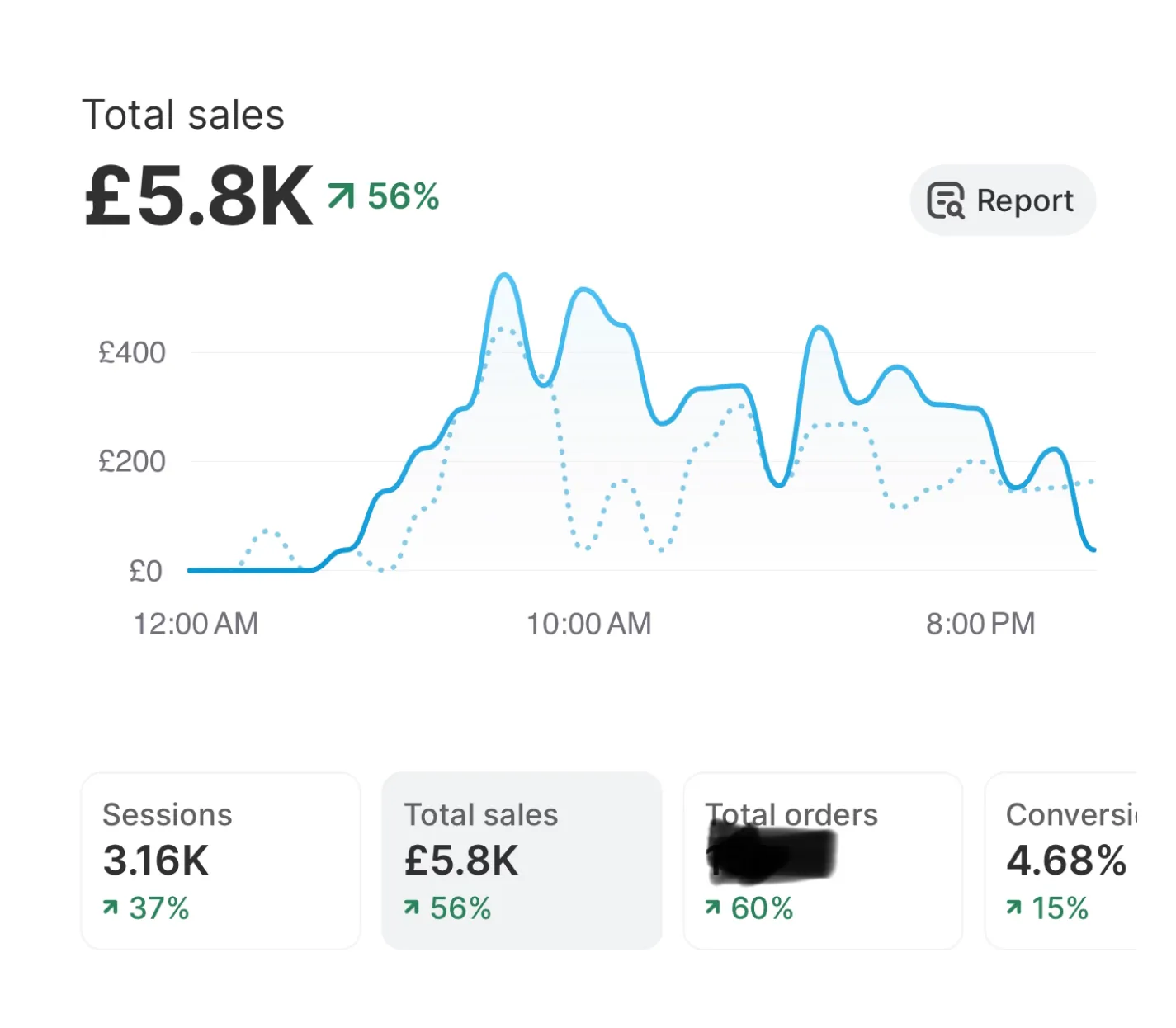
Revenue can make a Shopify store look healthy when the actual profit tells a very different story.
A product might generate hundreds of orders, but after product cost, supplier shipping, payment fees, ad spend, refunds, discounts, and app subscriptions, the margin can disappear fast. That is why a proper Shopify profit tracker matters. It does not just show what came in. It helps dropshipping store owners understand what they actually keep.
For dropshippers, this is even more important. Supplier costs change. Shipping times affect refunds. Ad costs fluctuate daily. Competitors adjust prices without warning. A basic Shopify dashboard can help you monitor store activity, but a dedicated dropshipping profit tracker gives you the operational clarity needed to scale without guessing.

Shopify’s analytics dashboard can show sales, sessions, and fulfillment metrics, and Shopify says this data is updated within about one minute. That makes it useful for monitoring activity, but profit-focused operators need to go deeper into costs, margins, suppliers, ads, and order outcomes. (Shopify Help Center)
Why Shopify Sales Alone Do Not Show Real Profit
A Shopify sales tracker is useful, but sales are not the same as profit.
Shopify sales reports can show information about customer orders by time, product, or channel. Shopify also defines gross profit in reports as net sales minus product cost. That is helpful, but it is still only one layer of profitability. Shopify also notes that sales reports do not track money moving between you and your customers, which means store owners need a broader profit view for real decision-making. (Shopify Help Center)

For a dropshipping store, the difference between sales and profit usually comes from hidden or delayed costs:
Product cost from the supplier. Shipping fees. Payment processing fees. Refunds. Returns. Discounts. Ad spend. Influencer costs. App subscriptions. Currency conversion. Chargebacks. Replacement orders. Supplier mistakes.
A product with high revenue can still be a bad product if it has a weak contribution margin. A campaign with strong ROAS can still lose money after COGS and fulfillment costs. A supplier with cheap product pricing can still hurt profit if shipping delays increase refunds.
That is where a Shopify profit tracker becomes more valuable than a basic revenue report. It turns scattered cost data into a clearer profit picture.
What a Shopify Profit Tracker Should Calculate
A good ecommerce profit tracker should show profit at the store level, product level, order level, and ideally campaign level.
At minimum, your profit formula should look like this:
Net profit = revenue minus product costs, shipping, payment fees, ad spend, refunds, discounts, taxes, app costs, and other operating expenses

Payment fees matter because they directly reduce margin. Shopify says Shopify Payments charges processing fees that vary by card type and location, and third-party transaction fees may apply when external payment providers are used. (Shopify Help Center) Shopify also says stores using Shopify Payments are not charged third-party transaction fees for eligible orders processed through Shopify Payments, Shop Pay, Shop Pay Installments, PayPal Express, and certain manual payment methods. (Shopify Help Center)
For dropshipping stores, a strong dropshipping profit tracker should include:
COGS by product and variant. Supplier shipping cost. Store revenue. Discounts. Refunds. Payment fees. Ad spend from Meta, Google, TikTok, or other channels. Product-level profit. Order-level margin. Net profit margin. Daily profit trends.
The key is not just seeing numbers. The key is seeing the numbers in time to make decisions.
If a product is profitable before ads but unprofitable after ads, you need to know before scaling the campaign. If a supplier cost increases, you need to know before your best seller quietly turns into a low-margin product. If refunds rise, your dashboard should make the issue visible before it damages cash flow.
The Best Dropshipping Dashboard Combines Profit, Orders, Products, and Competitors
A true dropshipping dashboard should help you run the business, not just report on it.
That means the best dashboard should connect profit tracking with the daily work of dropshipping: managing orders, tracking suppliers, researching products, monitoring competitors, and comparing store performance.

Nugglets is positioned as a dropshipping management platform that helps store owners track earnings, handle orders, research products, watch competitors, and manage multiple stores from one dashboard. It also highlights support for Shopify, WooCommerce, BigCommerce, suppliers, and competitor data. (Nugglets)
That matters because most dropshipping operators do not lose time in one place. They lose time switching between tabs.
One tab for Shopify. One tab for ads. One spreadsheet for product costs. One sheet for supplier notes. One document for competitors. One tool for product research. One inbox for order issues.
A cleaner Shopify dashboard brings those moving parts closer together. Instead of asking, “How many sales did we make?” the better question becomes, “Which products, suppliers, stores, and campaigns are actually creating profit?”
Real-Time Sales Tracking Helps You Catch Problems Faster
A real time ecommerce dashboard is useful because dropshipping margins can change quickly.
If a product starts selling fast, you need to know whether the supplier can keep up. If orders increase but profit drops, you need to know whether ad costs, discounts, or COGS changed. If a campaign drives revenue but refunds climb later, you need to know before scaling it again.

Shopify says order management includes viewing and tracking orders, processing payments, making changes to orders, and handling returns and refunds. (Shopify Help Center) For a dropshipping business, those order events are not just admin tasks. They are profit signals.
A strong Shopify order management dashboard should help you answer questions like:
Which orders are delayed? Which supplier is causing fulfillment issues? Which products have the highest refund rate? Which stores have the best margin? Which orders are profitable after shipping and fees? Which products are selling well but creating support problems?
When order tracking and profit tracking live separately, it is easy to miss patterns. When they live together, you can see whether operational issues are hurting the bottom line.
A Shopify Competitor Tracker Helps Protect Your Margins
Dropshipping is competitive by nature. Many stores sell similar or overlapping products, which means pricing, bundles, offers, ads, and product positioning can shift quickly.
A Shopify competitor tracker helps you monitor competing stores without relying on random manual checks. Searchers may also call this a Shopify spy tool or dropshipping spy tool, but the business value is simple: you want to understand what competitors are selling, how they price products, and where market demand is moving.

A competitor price tracker can help you notice when a similar store lowers prices, launches a bundle, changes shipping terms, or starts pushing a product you are also testing.
This does not mean blindly copying competitors. It means keeping enough visibility to make smarter decisions.
For example, if your competitor lowers the price on a product, you can decide whether to match, reposition, improve your bundle, change your ad angle, or move budget to a higher-margin item. If you see several competitors promoting the same product, that might signal demand, but it might also signal saturation.
A good dropshipping product research tool should help you separate real opportunity from crowded trends.
Multi-Store Dashboards Make Scaling Easier
Many dropshippers eventually run more than one store. That can be powerful, but it also makes reporting harder.
A multi store dashboard helps you compare stores from one place instead of jumping between separate Shopify accounts, spreadsheets, supplier chats, and ad accounts.

The goal is not just convenience. The goal is better decision-making.
With a multi-store view, you can compare:
Revenue by store. Net profit by store. Best-selling products. Supplier performance. Refund rates. Fulfillment delays. Ad spend efficiency. Product margins. Order volume. Store-level trends.
This is especially useful for operators testing products across different niches or markets. One store may have higher revenue, while another has better margins. One product may sell across multiple stores, but only one store may have the right audience, offer, or supplier setup to make it profitable.
Without a unified dashboard, those insights are easy to miss.
How to Choose the Best Shopify Profit Tracker
The best Shopify profit tracker is the one that gives you accurate answers quickly enough to act.
Do not choose a tool only because it has nice charts. Choose it because it helps you understand profit clearly and improve decisions across products, ads, suppliers, orders, and competitors.
Look for these capabilities:
Accurate cost tracking. The tool should support product costs, supplier shipping, ad spend, fees, discounts, refunds, and custom expenses.
Order-level profit visibility. You should be able to see whether individual orders are profitable after costs.
Product-level profitability. The dashboard should show which products are worth scaling and which are quietly draining margin.
Sales tracking. A strong Shopify sales tracker should show revenue trends, but also connect sales to profit.
Supplier management. Dropshipping profit depends heavily on supplier reliability, cost, delivery time, and issue rate.
Competitor monitoring. A Shopify competitor tracker helps you stay aware of pricing and product shifts.
Multi-store reporting. If you run more than one store, your dashboard should make comparison simple.
Clean daily workflow. You should be able to open the dashboard and know what needs attention.
The best dashboard does not overwhelm you with data. It helps you see what matters.
Daily Workflow: How to Use a Dropshipping Profit Tracker
A profit tracker becomes more valuable when it becomes part of your daily operating rhythm.
Start each day by checking net profit, not revenue. Revenue tells you how much activity happened. Profit tells you whether that activity was worth it.
Then review product performance. Look for products with strong sales but weak margins. These are often the products that trick store owners into scaling too early.
Next, check ad spend. A campaign might look strong inside an ad platform, but your dashboard should show whether it is profitable after product cost, shipping, and fees.
Then review order issues. Delays, refunds, cancellations, and failed fulfillments can all affect profit.
Finally, check competitor and product research signals. Look for pricing changes, emerging products, saturated products, and opportunities to test new offers.
A simple daily workflow could look like this:
Morning: review store profit, order issues, and ad spend.
Midday: check product-level margin and supplier updates.
Evening: review competitors, product research, and tomorrow’s testing priorities.
That rhythm keeps your business focused on decisions, not just reporting.
Conclusion: Track Profit Before You Scale
A Shopify store does not need more vanity metrics. It needs profit clarity.
A basic Shopify analytics dashboard can help you monitor store activity, sales, and fulfillment metrics. But if you are running a dropshipping business, you need a deeper view of true profit, supplier costs, ad spend, refunds, orders, competitors, and multi-store performance.
That is why a dedicated Shopify profit tracker or dropshipping dashboard matters.
The goal is simple: know what is actually working.
Not just which product gets sales. Not just which ad gets clicks. Not just which store has the most revenue.
The real question is: what is creating profit after every cost is counted?
That is the difference between guessing and operating.
For dropshippers who want one place to track profit, manage orders, research products, monitor competitors, and run multiple stores, Nugglets is built around that exact workflow: less tab chaos, clearer margins, and better decisions from one dropshipping management dashboard. (Nugglets)
Related Shopify tracker guides
- Shopify profit tracker - the core guide for tracking true net profit
- Shopify revenue vs profit - understand why revenue-only tracking is risky
- Ecommerce business dashboard - connect tracker data to daily operating decisions
- Multi-store Shopify dashboard - track profit and orders across more than one store
Run your whole store from one dashboard
Track orders, suppliers, inventory and real profit with Nugglets.
See NuggletsKeep reading
How to Start Dropshipping on Amazon 2026
How to Calculate Your Break-Even ROAS for Shopify


Comments 0