
How to Track Dropshipping Expenses Without a Spreadsheet
 Brian @brian
·
·
11 min read
12 views
Brian @brian
·
·
11 min read
12 views
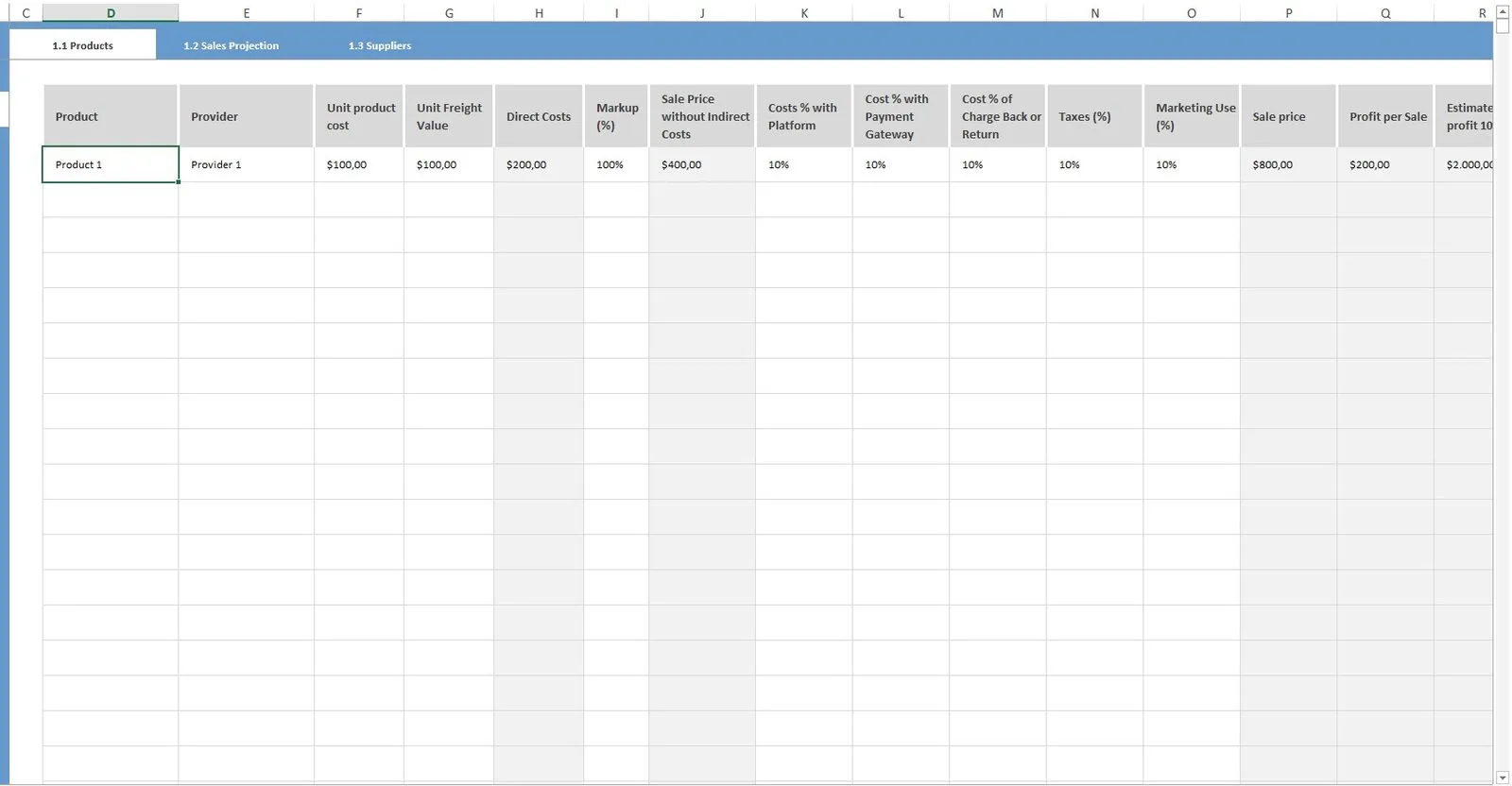
Tracking dropshipping expenses in a spreadsheet sounds simple at first. You create a few columns, add product cost, shipping cost, ad spend, Shopify fees, refunds, and profit. Then orders start coming in from different products, suppliers, countries, ad campaigns, payment processors, and stores.
Suddenly, the spreadsheet becomes the business.
For dropshipping store owners, the real challenge is not tracking revenue. Shopify already gives you sales visibility through reports such as sales over time, sales by product, and sales by channel. Shopify also has finance reports that help track financial information such as product sales and payments. (Shopify Help Center) The harder part is seeing true profit after COGS, supplier costs, payment fees, ad spend, shipping, refunds, discounts, and order issues.
That is where a dropshipping profit tracker or dropshipping dashboard becomes more useful than a spreadsheet. Instead of manually updating cells, you can use a real-time ecommerce dashboard to understand what each order actually costs, how much profit remains, and which products are worth scaling.

Why Spreadsheets Break Down for Dropshipping Expense Tracking
Spreadsheets work when your store is small, your product list is short, and your order volume is low. The problem is that dropshipping expenses are not static. Your supplier cost can change. Shipping costs can vary by country. Ad spend changes daily. Refunds may happen days or weeks after the original order. Payment fees depend on your payment method, plan, and market.
Shopify profit reports can be useful, but Shopify notes that profit reporting depends on adding cost per item to products and variants. If cost data is missing or inaccurate at the time of sale, your profit reporting can become incomplete. (Shopify Help Center)
A spreadsheet usually fails for four reasons:
First, it is too manual. Someone has to copy order data, supplier costs, ad spend, fees, and refunds into the sheet. Second, it is rarely real time. By the time the data is updated, yesterday’s winning product may already be losing money today. Third, formulas break. One wrong cell can distort your margins across hundreds of orders. Fourth, spreadsheets do not connect the whole picture. A sale, a refund, an ad cost, and a supplier price change often live in different tools.
A shopify profit tracker solves this by bringing expense data into one dashboard. The goal is not just cleaner reporting. The goal is better decisions.

The Dropshipping Expenses You Need to Track
Before replacing your spreadsheet, you need to know which expenses matter. Revenue alone can make a store look healthy while profit quietly disappears.
The most important dropshipping expenses include:
Product cost or COGS: This is what you pay the supplier for each item. In Shopify, cost per item is the base value needed for profit reporting. (Shopify Help Center)
Supplier shipping cost: Many dropshippers forget to separate product cost from shipping cost. If one supplier charges more for faster shipping or international orders, your margin changes.
Payment processing fees: Shopify Payments costs vary by plan, and Shopify notes that using Shopify Payments can avoid third-party transaction fees for certain order types. If you use third-party payment providers, additional transaction fees may apply depending on location and plan. (Shopify Help Center)
Ad spend: Meta defines “Amount Spent” as the approximate total spent on a campaign, ad set, or ad during its schedule. Google Ads also provides cost and billed cost reporting for campaigns and accounts. (facebook.com)
Refunds and returns: Refunds reduce revenue, but they can also create extra costs if the supplier does not refund you, if shipping is not recoverable, or if you offer store credit.
Discounts: A discount may increase conversion rate, but it can destroy margin if it is not compared against COGS and acquisition cost.
Apps and subscriptions: Shopify apps, product research tools, competitor trackers, email tools, review apps, upsell apps, and supplier tools all affect net profit.
Chargebacks and disputes: These are easy to miss in daily reporting, but they can have a major impact on profit.
A good ecommerce profit tracker should organize these costs by order, product, campaign, supplier, and store. That way, you are not just asking, “How much did we sell?” You are asking, “How much did we keep?”

How a Dropshipping Profit Tracker Replaces a Spreadsheet
A dropshipping profit tracker replaces the spreadsheet by turning manual tracking into automated visibility.
Instead of typing numbers into rows, you connect your store data, ad costs, product costs, fees, refunds, and order data into a dashboard. A tool like Nugglets should help store owners see profit at a glance, not only revenue. That matters because dropshipping margins can change quickly, especially when ad costs rise or supplier prices shift.
A spreadsheet usually tells you what happened after you update it. A real time ecommerce dashboard tells you what is happening now.
The best setup should show:
Revenue by day, product, store, and channel.
Gross profit after product cost and shipping.
Net profit after ad spend, fees, refunds, discounts, and other costs.
Profit margin by product.
Average order value.
Cost per order.
Refund rate.
Supplier performance.
Multi-store profit if you operate more than one Shopify store.
This is especially useful if you manage multiple products or stores. A multi store dashboard lets you compare performance without switching between admin panels, ad accounts, and spreadsheets.

Step 1: Connect Your Shopify Store Data
The first step is connecting your Shopify data. Your shopify dashboard already contains important sales and order information. Shopify sales reports can show order information by time, product, or channel, and Shopify finance reports can show key financial information such as product sales and payments. (Shopify Help Center)
But for expense tracking, store data is only the starting point.
You need each order to connect with the full cost stack behind it. That includes the item sold, selling price, discount, taxes, shipping charged to the customer, payment method, refund status, and fulfillment status.
A shopify sales tracker shows what came in. A shopify profit tracker shows what stayed.
For example, a product might generate $10,000 in monthly revenue. That looks strong until you find out that COGS, shipping, payment fees, ad spend, and refunds leave only $700 in profit. Without a profit dashboard, you might scale a product that is barely profitable.

Step 2: Add Product Costs and Supplier Costs
For dropshipping, product cost is not always simple. You may use multiple suppliers. You may test the same product from different sources. You may pay different rates depending on order volume, shipping method, destination, or supplier terms.
Shopify says profit reports require cost per item to be entered for products or variants, and that variants need their own cost values. (Shopify Help Center) That is a useful foundation, but many dropshipping stores need more detail than one static cost field.
Your dropshipping dashboard should help you track:
Cost per item.
Supplier shipping cost.
Supplier processing fees.
Bulk order pricing changes.
Variant-level costs.
Supplier-specific fulfillment cost.
Country-based shipping differences.
This is also where shopify supplier management becomes important. A cheap supplier is not really cheap if they create refunds, slow delivery, chargebacks, or bad reviews. Expense tracking should connect cost with fulfillment quality.
The goal is simple: know exactly how much each order costs before you decide whether a product is worth scaling.

Step 3: Track Ad Spend by Campaign and Product
Ad spend is one of the biggest reasons spreadsheets become unreliable. Your ad account changes every day, but your spreadsheet only changes when someone updates it.
Meta Ads Manager reports amount spent by campaign, ad set, or ad. Google Ads also offers campaign and account-level cost reporting, including served cost and billed cost. (facebook.com)
For dropshipping, you do not only need total ad spend. You need ad spend mapped to products and profit.
A product can have a high return on ad spend and still disappoint after fees, refunds, and supplier costs. This is why store owners should avoid judging products by ROAS alone. ROAS tells you how much revenue ads generated. Profit tracking tells you whether that revenue was worth buying.
A good dropshipping profit tracker should help answer:
Which product is profitable after ad spend?
Which campaign is producing revenue but losing money?
Which ad set has the best contribution margin?
How much can we spend per order and still make profit?
Should we scale, pause, or adjust pricing?
This is where a spreadsheet-free workflow becomes valuable. Your dashboard should make the decision obvious without hours of manual cleanup.

Step 4: Include Payment Fees, Refunds, and Discounts
Payment fees, refunds, and discounts are easy to underestimate because they do not feel like product expenses. But they directly affect net profit.
Shopify notes that Shopify Payments fees vary by plan, and third-party providers may involve transaction fees depending on location and plan. (Shopify Help Center) Those fees should be included in your profit calculations automatically.
Refunds also need to be tracked carefully. If a customer receives a refund, your revenue decreases. But your supplier may not refund your product cost. Your shipping cost may be gone. You may also lose money on payment fees or dispute costs.
Discounts are another hidden margin killer. A 20 percent discount on a product with a 30 percent margin can leave very little room for ad spend or refunds.
Your ecommerce profit tracker should show these costs clearly:
Payment processing fees.
Third-party transaction fees.
Refunded revenue.
Refunded orders by product.
Discount value.
Chargebacks.
Net profit after all deductions.
This helps you understand whether a promotion actually worked. A sale is only successful if it produces profitable orders.

Step 5: Use a Shopify Order Management Dashboard
A shopify order management dashboard helps connect expense tracking with operations. This matters because order issues often become profit issues.
Delayed fulfillment can lead to refunds. Supplier mistakes can lead to reshipments. Bad tracking information can lead to customer complaints. High-risk orders can lead to chargebacks. None of these problems show up clearly if you only look at revenue.
With a dashboard, you can monitor:
Open orders.
Fulfilled orders.
Delayed orders.
Canceled orders.
Refunded orders.
Supplier-specific order issues.
Cost per fulfilled order.
Profit by fulfillment status.
This is especially important for dropshipping stores that use multiple suppliers. A product may look profitable on paper, but if one supplier creates too many refunds, your real margin may be lower than expected.
Expense tracking should not be separate from order management. In dropshipping, fulfillment quality and profit are connected.

Step 6: Review Profit Daily, Not Just Monthly
The biggest benefit of using a dropshipping profit tracker is speed. A monthly spreadsheet review can tell you what went wrong after the money is already gone. A daily dashboard helps you catch margin problems early.
At minimum, review these numbers every day:
Revenue.
Gross profit.
Net profit.
Profit margin.
Ad spend.
Refunds.
Top products by profit.
Worst products by profit.
Orders with missing cost data.
You should also review trends. If revenue is rising but profit is flat, something is wrong. Your ad costs may be climbing. Your discounts may be too aggressive. Your supplier costs may have changed. Your refund rate may be increasing.
A real-time dashboard makes those problems visible before they damage the month.
Common Mistakes When Tracking Dropshipping Expenses
The most common mistake is treating revenue as profit. Shopify sales data is useful, but it is not enough to manage a dropshipping business. You need a complete view of costs.
Another mistake is using average product costs when actual costs vary by supplier, variant, or shipping destination. Averages can hide losing orders.
Many store owners also forget ad spend timing. Ad spend may happen today, while orders, refunds, and fulfillment costs appear across different days. Your dashboard should help smooth that view so you do not make decisions from incomplete data.
A fourth mistake is ignoring app costs. If you use multiple Shopify apps, product research tools, competitor tracking tools, email platforms, and fulfillment tools, those subscriptions should be reviewed as operating expenses.
Finally, some sellers wait too long to move away from spreadsheets. By the time a spreadsheet becomes painful, it may already be costing you time, accuracy, and profit.
Why Nugglets Fits This Workflow
Nugglets should be positioned as a dropshipping dashboard for store owners who want clearer expense and profit visibility without building spreadsheets.
Instead of asking sellers to manually calculate every order, a tool like Nugglets can help bring attention to the metrics that matter most:
True profit, not just revenue.
COGS and supplier cost tracking.
Ad spend visibility.
Refund and fee awareness.
Shopify sales tracking.
Multi-store dashboard clarity.
Order management insights.
Competitor and product research context.
This is the kind of workflow modern ecommerce sellers need. The best dropshipping tools do not just show more data. They make the right data easier to act on.
Final Thoughts: Stop Managing Profit in a Spreadsheet
You can track dropshipping expenses in a spreadsheet, but it becomes harder as your store grows. Every new product, supplier, ad campaign, refund, fee, and order issue adds more manual work.
A dropshipping profit tracker gives you a cleaner way to run the business. It helps you see revenue, expenses, and net profit in one place. It turns your shopify dashboard into a profit-focused command center. Most importantly, it helps you make faster decisions before small margin leaks become major losses.
For dropshipping sellers, the goal is not just to sell more.
The goal is to keep more.
A spreadsheet can record your business. A real-time dropshipping dashboard can help you understand it.
Run your whole store from one dashboard
Track orders, suppliers, inventory and real profit with Nugglets.
See NuggletsKeep reading
How to Start Dropshipping on Amazon 2026
How to Calculate Your Break-Even ROAS for Shopify


Comments 0